


















DNS port 53: choose the right transport test
Learn why DNS uses both UDP and TCP port 53, how encrypted DNS differs, and what a port test can prove before changing an authorized network policy.
 Written byYiyao

Module 1 | The port number is only part of the endpoint
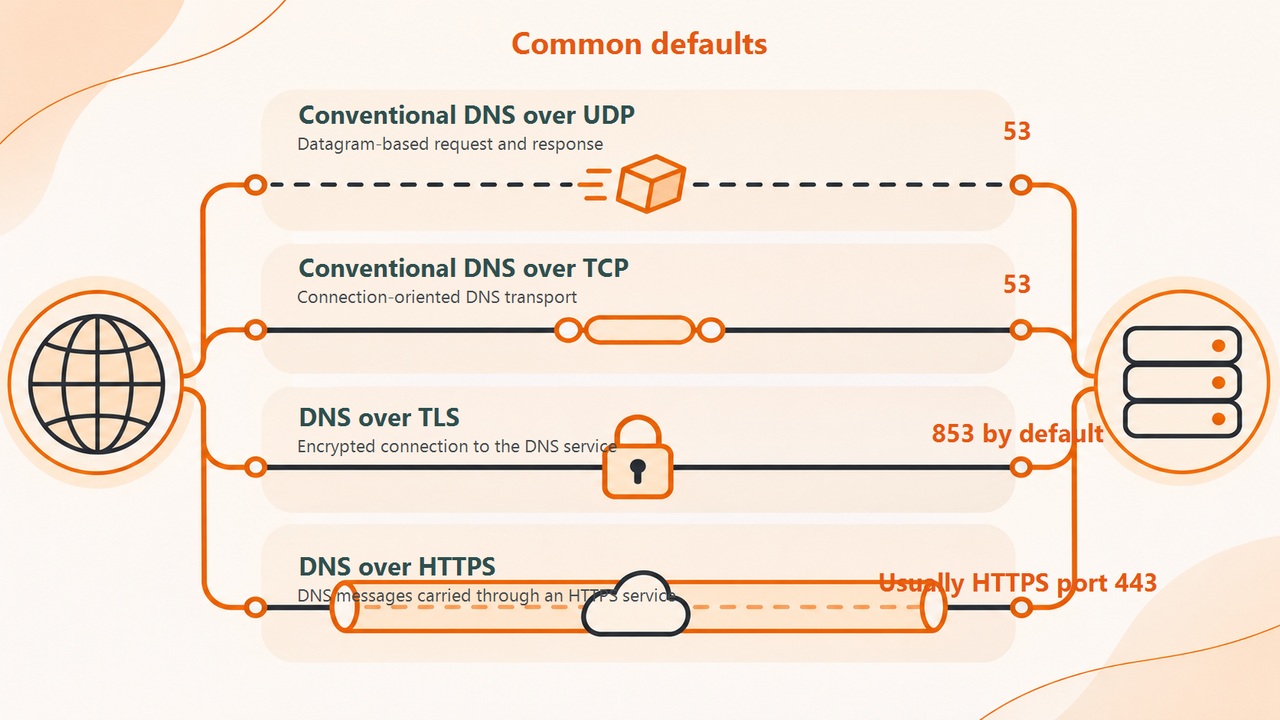
Conventional DNS uses port 53 with both UDP and TCP. The protocol is part of the endpoint: allowing UDP port 53 is not the same network rule as allowing TCP port 53. A useful troubleshooting record states the destination, transport, port, and actual DNS question.
Do not assume that DNS is exclusively UDP because a small lookup often uses it. DNS over TCP is a supported part of normal operation, not merely an optional feature that can always be blocked without consequence.
Module 2 | Compare the common transports
| Transport | Common destination port | What changes |
|---|---|---|
| Conventional DNS over UDP | 53 | Datagram-based request and response |
| Conventional DNS over TCP | 53 | Connection-oriented DNS transport |
| DNS over TLS | 853 by default | Encrypted connection to the DNS service |
| DNS over HTTPS | Usually HTTPS port 443 | DNS messages carried through an HTTPS service |
Service configuration can differ, so use the operator's documented endpoint. The table describes common transports, not a universal firewall policy. A browser using encrypted DNS may take a different resolution path from an ordinary command-line lookup.
Module 3 | Understand why TCP matters
A resolver can use TCP for DNS exchanges, including cases where a UDP response cannot carry the needed result. Blocking TCP while allowing UDP can therefore produce failures that appear only for particular responses or conditions.
A small A-record query may succeed while another query fails. That does not establish that the overall DNS path is healthy. Inspect the actual response and transport behavior with the network operator before changing authoritative records to compensate for a transport problem.
Module 4 | Know what a basic connection test proves
Test-NetConnection -ComputerName 1.1.1.1 -Port 53
On Windows PowerShell, this example tests a TCP connection to the stated public endpoint where network policy permits it. It does not send an equivalent UDP DNS query and does not verify the correctness of a DNS answer.
A successful TCP connection therefore cannot establish that an application's UDP lookup works. A failed connection may reflect a policy that requires the organization's resolver. Keep connectivity tests distinct from actual queries and use only approved destinations.
Module 5 | Work through a transport mismatch
In an illustrative network, a basic address query succeeds but a query requiring a TCP exchange fails. The administrator finds that the intended resolver is reachable over UDP 53 but the corresponding TCP path is denied. The repair is a reviewed policy correction for the authorized service, not disabling the firewall.
After the change, rerun the original failing query and a normal query from the affected client. Record protocol, destination, result, and time. Do not declare success solely because a generic port scanner reports an open port.
Module 6 | Keep client and server exposure separate
A client making queries does not need to become a public recursive DNS service. An authorized network rule should have a defined direction and destination. Avoid opening unrestricted inbound recursion to the Internet as a troubleshooting shortcut.
For private or managed networks, ask the responsible administrator which resolver and encrypted-DNS policy apply. Allowing every external resolver can break internal-name behavior or violate the intended security controls.
Module 7 | FAQ
Does HTTPS traffic on port 443 prove that DNS over HTTPS is being used? No. Most HTTPS traffic is unrelated to DNS. Inspect the application's configured resolver and the actual service contract.
Can I judge the network from an online lookup? An online tool runs from its own server. It provides a public comparison, not a test of your local firewall rules or DNS transport.
Module 8 | Use the result to narrow the fault
Return to the slow-DNS guide or resolver-not-responding guide with a clearer record of the transport and affected scope. Use Arcvenza NSLookup to inspect public answers while your network operator validates the local path. Keep the two observations separate in the final incident note.
Technical references
RFC 1035: DNS records · RFC 7766: DNS over TCP · RFC 7858: DNS over TLS